Hidden Coast: A Playful Script Font for Digital Creativity
As a web designer, choosing the right font can make or break a digital experience. Hidden Coast, a modern and playful handwritten script font, brings a unique energy to websites, landing pages, and brand-focused content. Its organic feel makes it ideal for creative projects that need a touch of personality without sacrificing readability.
Visual Characteristics and Style
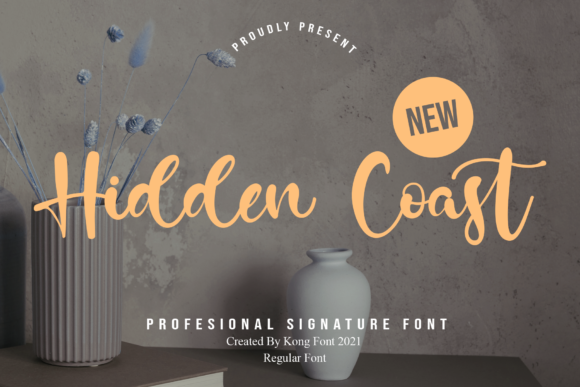
Hidden Coast has a casual, flowing style that mimics natural handwriting. It’s not overly ornate but carries enough character to stand out in headers, banners, and call-to-action sections. The font's curves and subtle variations give it a human-like touch, which is especially effective for branding that aims to feel approachable and authentic.
This font is particularly well-suited for designers who want to inject warmth into their layouts. Whether you're designing a boutique online store, a personal portfolio, or a coaching website, Hidden Coast adds a layer of visual interest that complements more structured typefaces.
Applications in Web Design
The versatility of Hidden Coast allows it to be used in multiple areas of a website. For instance, it works beautifully as a hero title on landing pages, where its playful nature can draw attention while maintaining clarity. When paired with a clean sans serif font for body text, it creates a balanced contrast that enhances visual hierarchy.
On a product landing page, using Hidden Coast for feature titles or section headings can help guide users through the content with ease. Its legibility ensures that even when used in smaller sizes, it remains readable on mobile screens and responsive layouts.
For blog headers or social media graphics, this font adds a creative flair that aligns with editorial or lifestyle content. It also performs well on dark backgrounds when used with sufficient contrast, making it suitable for digital ads and promotional banners.
Readability and User Engagement
While Hidden Coast is a display font, its design prioritizes readability in key areas. It’s best used for short phrases, headlines, and decorative accents rather than long blocks of text. This makes it perfect for buttons, logo text, and other elements that require quick scanning.
In conversion-focused layouts, such as course sales pages or online store banners, the font’s playful tone can enhance user engagement by creating a sense of trust and approachability. However, it’s important to ensure that the font doesn’t become too distracting, especially on small screens or in high-contrast environments.
When using Hidden Coast on dark backgrounds, consider using a light color or adding a subtle stroke to maintain legibility. Testing across different devices and screen sizes is essential to ensure consistent performance in various contexts.
Font Pairing and Brand Identity
To create a cohesive look, pair Hidden Coast with a simple sans serif font like Helvetica or Arial for body copy. This combination provides a strong visual contrast that supports both readability and brand identity.
If your brand leans toward a more editorial or professional tone, pairing Hidden Coast with a serif font can add sophistication while keeping the playful spirit of the script font intact. This balance is especially useful for digital magazines, packaging design, or creative agency websites.
For those looking to build a brand kit, including Hidden Coast as a signature font can help establish a consistent visual language across all digital assets. Its modern appeal makes it a great fit for startups, SaaS companies, and creative entrepreneurs aiming to stand out in a crowded market.
Practical Considerations
Before implementing Hidden Coast on a live site, check if it includes necessary styles, weights, and multilingual support. While it may not offer a wide range of weights, its single style is often enough for most web design needs.
Also, ensure that the font is available as a webfont for seamless integration into your website. If you plan to use it for client projects, online stores, or digital templates, confirm that the licensing allows commercial use. Many free fonts have restrictions, so always review the terms before deployment.
Finally, test the font in different scenarios—such as on image overlays, within cards, or alongside icons—to see how it interacts with other design elements. This will help you determine the best way to incorporate Hidden Coast into your digital workflow.